
Deleting your Survtapp account
Published
What the Danger Zone actually does, what happens to your responses, what happens to your subscription, and why you can sign up again with the same email straight away.
How do I delete my Survtapp account?
Settings, then the Account tab, then Delete Account in the Danger Zone: type DELETE and confirm. It closes the whole account for everyone, destroys every password and session, and cancels an active subscription immediately. It cannot be undone, so export anything you want first. Your email address is released straight away, so you can sign up again with it whenever you like.
Account deletion is in Settings, on the Account tab, in a card called Danger Zone. It is the Owner’s decision and it closes the whole account — not just your own login.
Before you do it
- Export anything you want to keep. Responses, contacts and signed waivers all export — see Exporting responses. Afterwards is too late to be comfortable.
- If you only want to stop paying, cancel or move to the free plan instead; and if you want to keep your data readable without collecting, look at vault mode. See Billing, Plans & Orders.
- If you only want to remove one person, remove that user from your team instead. Deleting the account closes it for everybody.
Doing it
- Go to Settings, then the Account tab.
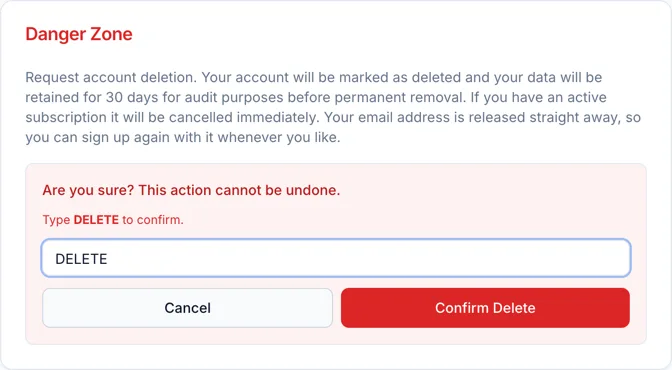
- In Danger Zone, click Delete Account.
- Type DELETE in the confirmation box — it has to be exactly that word.
- Click Confirm Delete.
What happens immediately
- The account is closed and marked as deleted. Nobody on it can sign in again, on the web or in the app.
- Every password, 2FA secret and reset token on the account is destroyed, and every session and mobile sign-in is revoked — including ones already in progress.
- An active paid subscription is cancelled there and then.
- Your email address is released, so you can sign up again with it whenever you like. That is deliberate: a deleted address that stayed claimed would lock you out of your own email forever.
What happens to the data
The account is kept as a closed record for 30 days for audit purposes before its responses are removed. During that window nothing is visible to you — you cannot sign in — so anything you want has to be exported first.
If you need the data gone sooner than that, or you need written confirmation of the deletion for your own compliance records, ask Survtapp support: email support@survtapp.com.
Frequently asked questions
Can I undo it?
No. The confirmation says so: "Are you sure? This action cannot be undone." Signing up again with the same address gives you a new, empty account rather than the old one back.
Can I sign up again with the same email?
Yes, straight away. Your address is released as part of the deletion.
Will I be refunded for the rest of the month?
Deletion cancels the subscription rather than issuing a refund. If you think a refund is due, ask support before you delete — after deletion there is no account to discuss it against.
My colleague deleted the account. Can I get it back?
Contact support immediately and do not create a new account in the meantime. The sooner you ask, the more likely something can be done, but treat it as unlikely rather than as a safety net.